Difference between revisions of "BCX Internet Switch"
(Created page with " The BCX Internet Switch tool is designed to allow users to change their internet settings. Located in C:\Program Files (x86)\BCX\Client, it is deployed by creating shortcuts...") |
m |
||
| (One intermediate revision by the same user not shown) | |||
| Line 2: | Line 2: | ||
The BCX Internet Switch tool is designed to allow users to change their internet settings. | The BCX Internet Switch tool is designed to allow users to change their internet settings. | ||
| − | Located in C:\Program Files | + | Located in C:\Program Files\BCX\Client, it is deployed by creating shortcuts including configurable parameters. |
Running BCXInternetSwitch.exe will give you the available parameters: | Running BCXInternetSwitch.exe will give you the available parameters: | ||
| − | [[File:bcx internet switch.png|link=]] | + | [[File:bcx internet switch.png|link=]] |
| Line 13: | Line 13: | ||
Shortcut deployed - "School Internet". | Shortcut deployed - "School Internet". | ||
| − | C:\Program Files | + | C:\Program Files\BCX\Client\BCXInternetSwitch.exe schoolproxy:8080 https://intranet 172.168.* bypasslocal |
Shortcut deployed - "Home Internet". | Shortcut deployed - "Home Internet". | ||
| − | C:\Program Files | + | C:\Program Files\BCX\Client\BCXInternetSwitch.exe none https://www.google.co.uk |
If the school proxy is set via GPO you could just deploy a "Home Internet" shortcut to remove the proxy when offline, which would re-apply onsite by group policy, or via a "School Internet" shortcut. | If the school proxy is set via GPO you could just deploy a "Home Internet" shortcut to remove the proxy when offline, which would re-apply onsite by group policy, or via a "School Internet" shortcut. | ||
Latest revision as of 14:55, 21 May 2021
The BCX Internet Switch tool is designed to allow users to change their internet settings.
Located in C:\Program Files\BCX\Client, it is deployed by creating shortcuts including configurable parameters.
Running BCXInternetSwitch.exe will give you the available parameters:
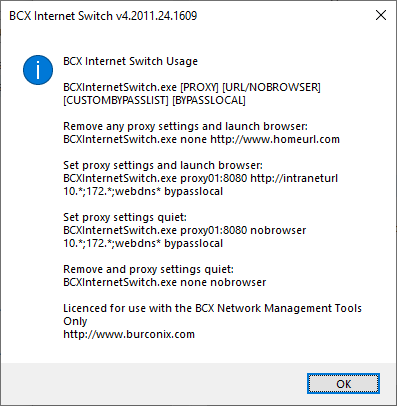
For example, you could create 2 shortcuts for your staff laptops:
Shortcut deployed - "School Internet". C:\Program Files\BCX\Client\BCXInternetSwitch.exe schoolproxy:8080 https://intranet 172.168.* bypasslocal
Shortcut deployed - "Home Internet". C:\Program Files\BCX\Client\BCXInternetSwitch.exe none https://www.google.co.uk
If the school proxy is set via GPO you could just deploy a "Home Internet" shortcut to remove the proxy when offline, which would re-apply onsite by group policy, or via a "School Internet" shortcut.
Replacing the URL with a nobrowser parameter will silently update the settings without opening the default browser.
Return to Contents page